

Setting up a guest Wi-Fi network is a critical step for any host who wants to provide internet access to visitors without compromising the security or performance of their primary network. A guest network is a separate wireless access point that isolates visitors from the main network, protecting sensitive data and devices while offering convenience.

Understanding how to properly configure this network not only enhances security but also improves user experience for guests.
In this article, we will explore why every host should implement a guest Wi-Fi network and provide a detailed, practical guide on how to set it up effectively.
The goal is to equip you with the knowledge to protect your home or business network while keeping your visitors connected.
The Essentials of Setting Up a Guest Wi-Fi Network
- Guest Wi-Fi networks create isolated access points that prevent visitors from reaching private devices or sensitive information on the host’s main network.
- Proper configuration involves setting up separate SSIDs (Service Set identifier), strong passwords, and bandwidth management to balance security and performance.
- Many modern routers support guest networks natively, but understanding the settings and potential pitfalls is key to effective implementation.
- Segmentation through VLANs or dedicated hardware enhances security, especially in business environments.
- Guest networks are not foolproof; hosts should monitor traffic and update configurations regularly to maintain security.
What is a Guest Wi-Fi Network and Why is It Important for Hosts
A guest Wi-Fi network is a distinct wireless network created to provide internet access exclusively for visitors without granting them entry into the host’s primary network. Technically, this is achieved by isolating the guest network’s traffic from the main LAN (Local Area Network), often utilizing separate SSIDs (Service Set Identifiers) and firewalls.
In everyday language, this means guests can browse the internet, check emails, or stream content without accessing devices such as personal computers, printers, or file servers connected to the main network.
This separation is essential for maintaining privacy, preventing malware spread, and reducing the risk of unauthorized access to sensitive data.
For hosts—whether at home or in a business setting—providing a secure guest network is a best practice that balances hospitality with cybersecurity.
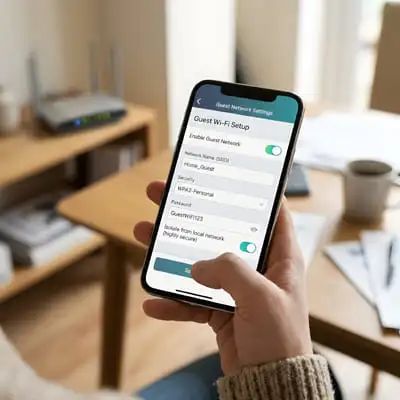
“In practice, a guest Wi-Fi network functions as a secure buffer zone, allowing internet access while shielding the host’s primary network from potential threats posed by external devices.”
How to Set Up a Guest Wi-Fi Network on Your Router
Setting up a guest Wi-Fi network requires accessing your router’s administrative interface. This process varies by manufacturer but generally follows these steps:
- Log into the router’s admin panel: Usually accessed via a web browser at an IP address like 192.168.1.1 or 192.168.0.1.
- Locate the guest network settings: Often found under Wireless or Wi-Fi settings.
- Enable the guest network: Activate the guest SSID and assign a recognizable name that clearly indicates it is for guests.
- Set a strong password: Use WPA3 encryption if available, or at minimum WPA2, and create a unique, complex passphrase.
- Configure access restrictions: Enable client isolation so devices on the guest network cannot communicate with each other or the main network.
- Limit bandwidth and set time restrictions: If your router supports it, apply bandwidth limits or schedule active hours to manage network load and security.
Once configured, test the guest network with multiple devices to ensure connectivity and isolation from the main network.
Security Benefits and Limitations of Guest Wi-Fi Networks
Guest networks significantly reduce security risks by segregating traffic and preventing unauthorized access to critical devices.

This is particularly effective in environments where guests might unknowingly connect infected devices or attempt to access network resources.
However, the security of a guest network depends on several factors.
If the router’s firmware is outdated or the guest network is poorly configured, vulnerabilities may arise.
For example, some routers do not fully isolate guest traffic, allowing savvy users to bypass restrictions.
Additionally, guest networks typically do not encrypt traffic beyond standard Wi-Fi encryption, which means that without VPNs or additional security measures, data transmitted on the guest network can still be intercepted.
“A guest network enhances security by design but should not be seen as a standalone solution; comprehensive network hygiene and monitoring remain essential.”
Advanced Guest Network Configurations for Businesses and Tech-Savvy Users
Beyond basic guest Wi-Fi setups, businesses and advanced users often implement VLANs (Virtual Local Area Networks) to create robust network segmentation. VLANs allow multiple logical networks to coexist on the same physical hardware, providing granular control over traffic flow.

Using VLANs, a business can isolate guest traffic from internal operations, apply firewall rules, and monitor usage separately.
Combined with RADIUS (Remote Authentication Dial-In User Service) servers, this setup offers secure authentication methods and dynamic access control.
Additionally, guest portals—often called captive portals—allow hosts to present terms of service, collect user credentials, or limit internet usage time, enhancing compliance and user management.
Deploying these technologies requires networking expertise and compatible equipment but results in a scalable, secure guest access solution suitable for environments with high visitor traffic.
Common Issues and Best Practices When Managing Guest Wi-Fi Networks
Hosts frequently encounter challenges such as connectivity problems, slow speeds, or accidental exposure of private network resources. These issues often stem from misconfiguration, outdated equipment, or inadequate bandwidth allocation.
Best practices to avoid such pitfalls include:
- Regularly updating router firmware to patch vulnerabilities.
- Using unique SSIDs and strong, regularly changed passwords for guest networks.
- Monitoring connected devices and usage patterns to detect suspicious activity.
- Educating guests about acceptable use policies to prevent illegal or harmful activities.
- Segmenting network traffic using VLANs or firewalls where possible.
On a practical note, I have seen cases where guests unintentionally slowed down the main network by hogging bandwidth because the guest network lacked proper traffic shaping controls. Implementing bandwidth limits resolved this without impacting user experience.
What to Do Now: Steps to Implement Your Guest Wi-Fi Network
Start by evaluating your current router’s capabilities and reviewing the manufacturer’s documentation on guest network configuration. If your device lacks guest network support, consider upgrading to a modern router that offers advanced security features.
Next, configure a guest SSID with a strong password and activate client isolation. Test the setup with multiple devices to confirm both accessibility and security. Regularly update your router’s firmware and monitor usage to maintain performance and safety.
For business environments, explore VLAN configurations and captive portal solutions to professionalize guest access. Implementing these measures not only protects your network but also signals that your organization values security and responsible connectivity.
Frequently Asked Questions (FAQ)
What is the Main Difference Between a Guest Wi-Fi Network and a Regular Wi-Fi Network?
A guest Wi-Fi network is designed to provide internet access to visitors while isolating their devices from the host’s primary network, preventing access to sensitive devices and data. In contrast, a regular Wi-Fi network connects all devices on the same internal network, allowing full communication between them. This separation enhances security and privacy for the host’s devices.
Can Guest Wi-Fi Networks Be Hacked More Easily Than Regular Networks?
Guest networks are not inherently less secure but may be more vulnerable if poorly configured, such as using weak passwords or outdated encryption standards. Properly set up guest networks with strong WPA3 encryption and client isolation offer robust security. However, all Wi-Fi networks carry some risk, so regular updates and monitoring are essential.
Is It Possible to Limit How Much Internet Bandwidth Guests Can Use on a Guest Network?
Yes, many routers allow bandwidth management or Quality of Service (QoS) settings that limit how much speed or data guests can consume. This prevents guests from hogging bandwidth and ensures the host’s primary network maintains optimal performance, especially in environments with many users.
Do All Routers Support Guest Wi-Fi Networks?
Most modern routers include guest network functionality, but some older or basic models may not. If guest network support is unavailable, upgrading to a newer router or using additional access points designed for guest access can provide this feature. Check your router’s specifications or manual to confirm.
Should I Use a Captive Portal for My Guest Wi-Fi Network?
Captive portals redirect users to a login or terms of service page before granting internet access. They are highly recommended for businesses or public venues to control access, enforce policies, and collect user data if needed. For home networks, captive portals are optional but can add a layer of professionalism and security.

Architect with extensive experience in residential and commercial design, including renovations and modular construction. Love to share information about Architecture, home and lifestyle in this blog.